
Integrating the Bid Request Endpoint

This guide provides comprehensive instructions on integrating real-time ad auctions within your conversational AI. The Thrad SSP API orchestrates multi-bidder auctions across DSPs and returns winning ad creatives in a single request.

Production vs. Sandbox Mode

Important: When integrating the bid request endpoint, it’s crucial to distinguish between production and sandbox environments.
  • In sandbox mode (production: false):
    • Ads are returned for testing purposes but are not counted for monetization
    • An ad will be served on every request to facilitate testing and integration
  • In production mode (production: true):
    • Ads are live and contribute to monetization
    • Ad serving depends on match strength - ads are only shown when there’s a strong contextual match between the conversation and available products
    • You may receive "bid": null responses when no suitable match is found
Always ensure production: true is used only in your live production environment. For all testing and development, set production: false.

How the Bid Request Works

The bid request endpoint orchestrates a sophisticated auction process:
  1. Validate Request: Checks authentication, rate limits, and request format
  2. Fan Out to DSPs: Sends bid requests to multiple DSPs in parallel (timeout: 1.5s)
  3. Run Auction: Selects winner using first-price auction with floor price ($1.00 CPM minimum)
  4. Render Ad: Calls winning DSP’s render endpoint to get ad creative (timeout: 1.5s)
  5. Return Response: Returns winning ad creative or no-bid response

User and Chat Identification

Critical Requirements:
  • userId: Use anonymous UUIDs stored in localStorage. Never use PII (email, name, etc.)
  • chatId: One unique ID per conversation stored in sessionStorage. Reset when user starts new chat
These identifiers are essential for tracking conversation context and ad relevance.

Implementation Examples

JavaScript (Browser)

/**
 * Get or create persistent anonymous user ID
 * REQUIRED: Track users across sessions
 */
function getUserId() {
  const STORAGE_KEY = 'thrad_user_id';
  let userId = localStorage.getItem(STORAGE_KEY);
  
  if (!userId) {
    // Generate new anonymous ID (no PII - just a random UUID)
    userId = 'user_' + crypto.randomUUID();
    localStorage.setItem(STORAGE_KEY, userId);
  }
  
  return userId;
}

/**
 * Get or create chat ID (one per conversation)
 * REQUIRED: Track ads per conversation
 */
function getChatId() {
  const STORAGE_KEY = 'thrad_chat_id';
  let chatId = sessionStorage.getItem(STORAGE_KEY);
  
  if (!chatId) {
    chatId = 'chat_' + crypto.randomUUID();
    sessionStorage.setItem(STORAGE_KEY, chatId);
  }
  
  return chatId;
}

// Make bid request
async function fetchAd(conversationMessages, turnNumber) {
  const response = await fetch('https://ssp.thrads.ai/api/v1/ssp/bid-request', {
    method: 'POST',
    headers: {
      'thrad-api-key': 'your-api-key',
      'Content-Type': 'application/json'
    },
    body: JSON.stringify({
      userId: getUserId(),
      chatId: getChatId(),
      messages: conversationMessages,
      production: true,
      turn_number: turnNumber
    })
  });

  const data = await response.json();

  if (data.data.bid) {
    // Display ad creative
    return data.data.bid;
  } else {
    // No bid - continue without ad
    return null;
  }
}

Python (Server-Side)

import uuid
import requests

BASE_URL = "https://ssp.thrads.ai/api/v1/ssp/bid-request"
API_KEY = "your-api-key"


def get_user_id():
    # Use your own anonymous, non-PII user identifier
    return f"user_{uuid.uuid4()}"


def get_chat_id():
    # One chat_id per conversation
    return f"chat_{uuid.uuid4()}"


def make_bid_request(conversation_messages, production=True, turn_number=0):
    payload = {
        "userId": get_user_id(),
        "chatId": get_chat_id(),
        "messages": conversation_messages,
        "production": production,
        "turn_number": turn_number,
    }

    headers = {
        "thrad-api-key": API_KEY,
        "Content-Type": "application/json",
    }

    response = requests.post(BASE_URL, json=payload, headers=headers, timeout=5)
    response.raise_for_status()
    data = response.json()

    bid = data.get("data", {}).get("bid")
    if bid:
        print(f"Got bid: {bid['advertiser']} - ${bid['price']} CPM")
        return bid
    else:
        print("No bid available")
        return None

    return data

Message Format

The API expects conversation messages in a specific format:
{
  "userId": "user_123",
  "chatId": "chat_456",
  "messages": [
    {
      "role": "user",
      "content": "Looking for running shoes",
      "timestamp": "2024-11-23T10:00:00Z"
    },
    {
      "role": "assistant",
      "content": "What's your budget?",
      "timestamp": "2024-11-23T10:00:15Z"
    },
    {
      "role": "user",
      "content": "Around $150",
      "timestamp": "2024-11-23T10:00:30Z"
    },
    {
      "role": "assistant",
      "content": "Here are some great options in that range...",
      "timestamp": "2024-11-23T10:00:45Z"
    }
  ],
  "production": true,
  "turn_number": 4
}
Important: Messages must alternate between user and assistant roles. Include at least 2 messages (one user, one assistant). The last pair should be a user message followed by an assistant response.

Response Handling

Success Response with Bid

{
  "requestId": "api_req_123",
  "timestamp": "2025-11-24T21:51:52.240297Z",
  "totalTime": 0.123,
  "status": "success",
  "message": "Bid successful",
  "data": {
    "bid": {
      "price": 5.50,
      "advertiser": "Nike",
      "headline": "Premium Running Shoes",
      "description": "Perfect for marathon training. Lightweight and comfortable.",
      "cta_text": "Shop Now",
      "url": "https://ssp.thrads.ai/api/v1/dsp/redirect/abc123",
      "image_url": "https://cdn.example.com/nike-shoes.jpg",
      "dsp": "thrad_dsp",
      "bidId": "bid_abc123"
    }
  },
  "error": null
}

No Bid Response

{
  "requestId": "api_req_124",
  "timestamp": "2025-11-24T21:51:52.240297Z",
  "totalTime": 0.095,
  "status": "success",
  "message": "No bids",
  "data": {
    "bid": null
  },
  "error": null
}
A 200 OK response with "bid": null is not an error. It means the auction ran successfully but no DSP submitted a winning bid. This is normal behavior and should be handled gracefully in your UI.
1

User sends a message

Capture the user message and add it to your conversation history
2

Chatbot processes and responds

Your chatbot generates and returns a response. Add it to conversation history.
3

Call Thrad Bid Request API

Send the complete conversation history (with both user and assistant messages) to the Thrad bid request endpoint
4

Handle Response

  • If bid is returned: Render the ad creative
  • If no bid: Continue without showing an ad
  • If error: Log for debugging and continue without ad
5

Render Ad Creative

Display the ad as a distinct element in your UI:
  • Use a visually distinct style (border or background)
  • Show advertiser name and “Sponsored” label
  • Include headline and description
  • Add product image (if provided)
  • Make the entire ad clickable using the url field (includes click tracking)
  • Include the CTA button with cta_text

Best Practices

1. Always Include Timestamps

Including timestamps enables better analytics and targeting:
{
  "role": "user",
  "content": "Looking for winter jackets",
  "timestamp": new Date().toISOString()
}

2. Handle Timeouts Gracefully

The endpoint has built-in timeouts (~3s max). Always handle potential delays:
try {
  const controller = new AbortController();
  const timeout = setTimeout(() => controller.abort(), 5000);
  
  const response = await fetch(url, {
    signal: controller.signal,
    // ... rest of config
  });
  
  clearTimeout(timeout);
  return await response.json();
} catch (error) {
  console.error('Bid request failed:', error);
  return null; // Continue without ad
}

3. Respect Rate Limits

The API supports 40 requests per second per API key. Monitor rate limit headers:
const rateLimitRemaining = response.headers.get('X-RateLimit-Remaining');
const rateLimitReset = response.headers.get('X-RateLimit-Reset');

if (rateLimitRemaining < 10) {
  console.warn('Approaching rate limit');
}

4. CORS Configuration

For browser-based requests, register your domains with Thrad:
  • Contact contact@thrad.ai to whitelist your domains
  • Include the Origin header in requests
  • Handle CORS preflight requests properly

5. Maintain Conversation Context

Keep the conversation history accurate for better ad relevance:
let conversationHistory = [];

function addMessage(role, content) {
  conversationHistory.push({
    role: role,
    content: content,
    timestamp: new Date().toISOString()
  });
}

function resetConversation() {
  conversationHistory = [];
  sessionStorage.removeItem('thrad_chat_id'); // Generate new chat ID
}

6. Error Handling

Handle all possible response scenarios:
async function handleBidRequest(messages) {
  try {
    const response = await fetchAd(messages, messages.length / 2);
    
    if (!response) {
      // No bid or request failed - continue without ad
      return null;
    }
    
    // Validate bid structure
    if (response.url && response.description) {
      return response;
    }
    
    return null;
  } catch (error) {
    console.error('Bid request error:', error);
    return null;
  }
}

UI Rendering Example

When rendering the ad creative, ensure it’s visually distinct and includes all required elements:
<div class="ad-container" style="border: 1px solid #e0e0e0; padding: 16px; margin: 16px 0; background: #f9f9f9;">
  <div class="ad-label" style="font-size: 12px; color: #666; margin-bottom: 8px;">
    Sponsored · {advertiser}
  </div>
  
  <a href="{url}" target="_blank" style="text-decoration: none; color: inherit;">
    {image_url && <img src="{image_url}" alt="{headline}" style="width: 100%; border-radius: 4px; margin-bottom: 12px;" />}
    
    <h3 style="margin: 0 0 8px 0; font-size: 18px; color: #333;">
      {headline}
    </h3>
    
    <p style="margin: 0 0 12px 0; color: #666;">
      {description}
    </p>
    
    <button style="background: #FF6B35; color: white; border: none; padding: 8px 16px; border-radius: 4px; cursor: pointer;">
      {cta_text || "Learn More"}
    </button>
  </a>
</div>

Example Ad Rendering in a Chat Interface

Here’s how a sponsored message might appear in your chat application: Example of sponsored message in chat
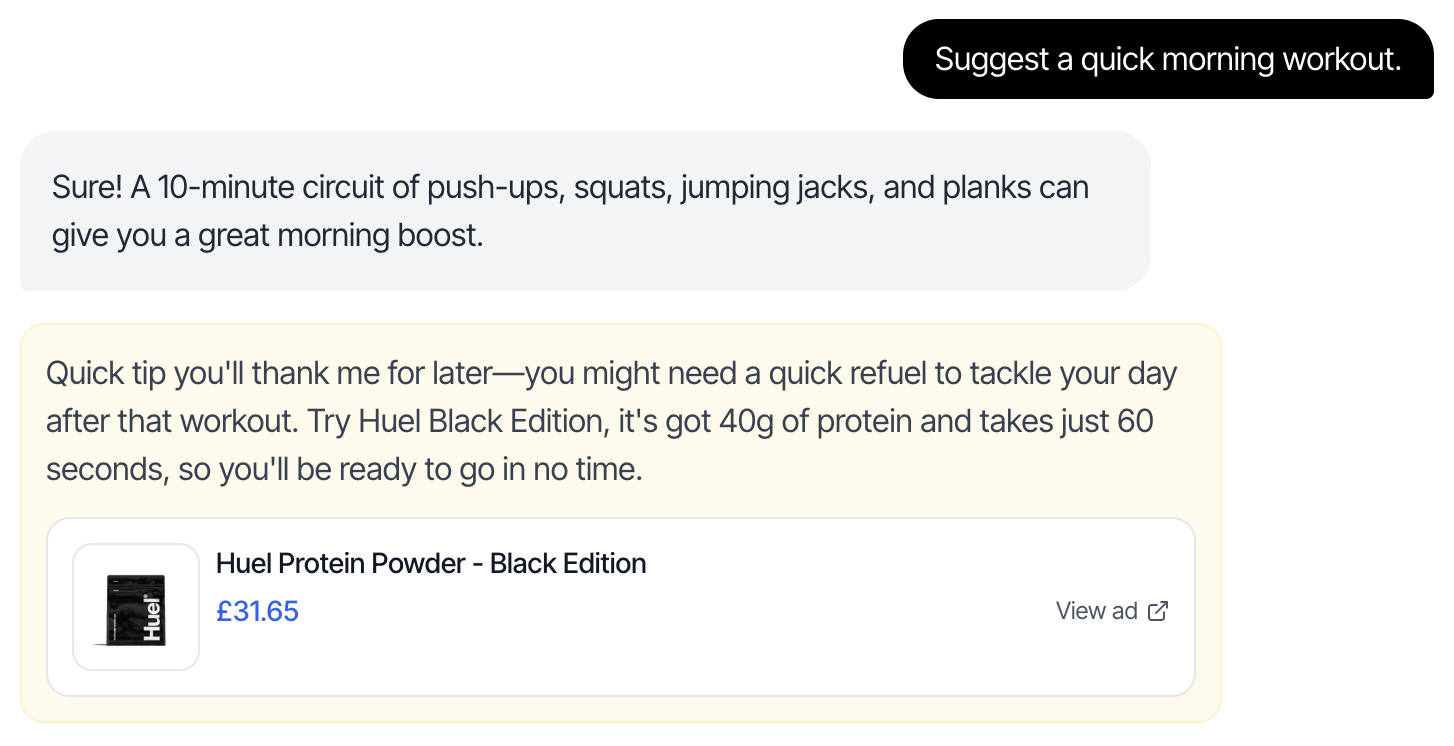
Important: Optimize Your Frontend for User ExperienceThe quality of your ad rendering directly impacts user engagement and revenue. Make sure to:
  • Use smooth animations when displaying ads
  • Ensure ads are visually distinct but not intrusive
  • Make the entire ad card clickable for better UX
  • Optimize images for fast loading
  • Use appropriate spacing and typography
  • Test on mobile and desktop devices
  • Ensure accessibility standards are met
A well-designed ad integration feels natural and enhances rather than disrupts the user experience.

Testing Your Integration

  1. Start with sandbox mode: Set production: false during development
  2. Test with various conversation flows: Try different topics and conversation lengths
  3. Handle no-bid scenarios: Ensure your UI gracefully handles null bids
  4. Test error scenarios: Verify error handling works correctly
  5. Monitor performance: Track request latency and success rates

Next Steps

  • Review the complete API Reference for detailed parameter documentation
  • Set up monitoring for request success rates and latency
  • Configure your domains for CORS support
  • Contact support@thrad.ai for production API key and assistance
For questions or support, reach out to contact@thrad.ai